When I first started using Pinterest, I made the same mistake most beginners make. I treated Pinterest like social media. I posted random images, added short captions, and expected clicks. Nothing happened. My pins barely got 5–10 impressions, and sometimes zero clicks.
Later, I realized something important:
- Pinterest is not a social media platform.
- Pinterest is a visual search engine.
Once I started treating Pinterest like Google SEO, my results completely changed. One of my pins went from 12 impressions to 100000 impressions in 3 weeks, and that single pin started sending consistent traffic to my website.
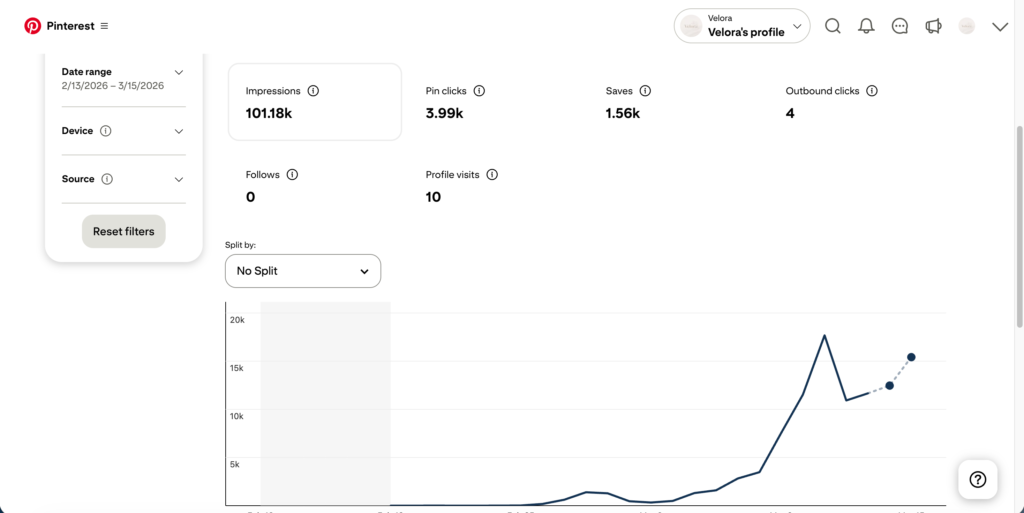
This guide is based on actual experience running Pinterest accounts and testing pin strategies, not theoretical advice. Let’s break down how Pinterest SEO actually works and how you can rank your pins in Pinterest search.
Understanding How Pinterest Search Works
Pinterest’s algorithm works very similar to Google.
When someone searches for something like:
- “Pinterest marketing tips”
- “small business ideas”
- “healthy dinner recipes”
Pinterest tries to show the most relevant pins based on several signals.
From my testing, these signals matter the most:
- Pin title keywords
- Pin description keywords
- Text on the pin image
- Board title
- Board description
- Pin engagement (clicks, saves, close-ups)
- Consistency of posting
If your pin is optimized correctly, Pinterest understands what the content is about and starts showing it in search results.
Step 1: Find the Right Pinterest Keywords
The biggest mistake beginners make is not doing keyword research.
Pinterest literally tells you what people are searching for.
Simple Method I Use
- Open Pinterest
- Go to the search bar
- Start typing a keyword
Example:
If I type:
Pinterest SEO
Pinterest automatically suggests:
- Pinterest SEO tips
- Pinterest SEO strategy
- Pinterest SEO for beginners
- Pinterest SEO guide
These suggestions are real search queries people use.
That means they are perfect keywords for your pins.
Real Example
For one of my pins, I used this keyword:
“Pinterest Marketing Tips for Beginners”
And I placed it in:
- Pin title
- Pin description
- Pin image text
After about 10 days, the pin started appearing in Pinterest search.
Step 2: Create a Pin That Actually Gets Clicks
Pinterest SEO alone is not enough. If your pin design is boring, people will scroll past it. I learned this the hard way. My early pins looked like basic blog images. They got impressions but no clicks. Then I started designing pins specifically for Pinterest.
What Works Best
From my testing:
Good Pinterest pins usually have:
• Bright background
• Big readable text
• Clear benefit
• Vertical layout
Ideal Pin Size
Pinterest recommends:
1000 × 1500 pixels
Aspect ratio: 2:3
Tools I personally use:
- Canva
- Adobe Express
Most of my pins are designed in Canva because it already has Pinterest templates.
Example of a Good Pin Title
Instead of writing:
❌ Pinterest Guide
Write:
✔ Pinterest SEO Guide: Rank Your Pins in 7 Steps
Clear, direct, and curiosity-driven.
Step 3: Optimize the Pin Title Properly
The pin title is one of the strongest SEO signals. Pinterest reads the title to understand what your pin is about.
A good title should:
• Include the main keyword
• Be natural
• Be clear and helpful
Example
Bad title:
❌ Learn Pinterest
Good title:
✔ Pinterest SEO Guide: How to Rank Pins on Pinterest Search
Notice the difference.
The second title includes:
- Pinterest SEO
- Rank Pins
- Pinterest Search
That’s 3 keyword signals.
Step 4: Write a Natural Pin Description
Many people ignore the pin description.
But Pinterest reads descriptions to understand context.
I usually write 2–3 sentences, not a huge paragraph.
Example Description
Here’s a real structure I use:
Learn how Pinterest SEO works and how to rank your pins in Pinterest search results.
This guide shares practical Pinterest marketing strategies, keyword tips, and real examples that helped grow traffic.
Notice something important.
I did not stuff keywords.
Pinterest actually prefers natural language.
Step 5: Use the Keyword in the Pin Image Text
This is something many bloggers miss. Pinterest can read text inside images. So if your keyword is:
Pinterest SEO Guide
Your pin design should include that phrase.
Example text on pin:
Pinterest SEO Guide
How to Rank Pins in Search
When I started doing this, my pin impressions increased noticeably.
Step 6: Choose the Right Board
Another Pinterest SEO factor is board relevance.
Example:
If your pin is about Pinterest marketing, do not save it to a random board like:
❌ Social Media Ideas
❌ Business Motivation
Instead, create a specific board like:
✔ Pinterest Marketing Tips
✔ Pinterest SEO Strategies
Pinterest reads the board title and description to understand the topic.
Step 7: Post Consistently (Pinterest Loves Fresh Pins)
One thing I noticed after months of testing:
Pinterest rewards consistent creators. When I posted 1–2 pins daily, my account growth improved dramatically. When I stopped posting for 2 weeks, my impressions dropped.
My Simple Schedule
What works for me:
Daily pins: 3–5 pins
You can use scheduling tools like:
- Tailwind
But honestly, I mostly schedule directly inside Pinterest.
Step 8: Create Multiple Pins for the Same Article
This strategy alone helped me grow Pinterest traffic.
Instead of creating one pin per blog post, I create 5–10 pins.
Each pin has:
- Different title
- Different design
- Same article link
Real Example
For one article, I created pins like:
1️⃣ Pinterest SEO Tips for Beginners
2️⃣ How to Rank Pins on Pinterest Search
3️⃣ Pinterest Marketing Strategies That Work
4️⃣ Pinterest Traffic Guide
One of those pins eventually took off and started bringing traffic.
Pinterest often tests different pins before deciding which one ranks.
Step 9: Focus on Clicks, Not Just Saves
Many people think saves are the most important metric.
But Pinterest actually cares more about:
- Link clicks
- Close-ups
- Engagement
If users click your pin and stay on your site, Pinterest sees that as a quality signal.
That’s why your pin title and design must create curiosity.
Common Pinterest SEO Mistakes (That I Personally Made)
Let me share a few mistakes I made early on.
Mistake 1: Keyword Stuffing
Example:
Pinterest SEO Pinterest tips Pinterest marketing Pinterest strategy Pinterest guide
This looks spammy.
Pinterest prefers natural descriptions.
Mistake 2: Posting Random Content
At first, I posted pins about:
- marketing
- tech
- quotes
- business
- travel
Pinterest got confused about my niche.
After focusing on one niche, my account grew faster.
Mistake 3: Ignoring Pin Design
SEO alone doesn’t rank pins.
If users don’t click, Pinterest will stop showing your content.
Good design = higher engagement.
Real Pinterest Growth Example
One of my pins performed like this:
Week 1
Impressions: 40
Week 2
Impressions: 1,200
And Week 3
Impressions: 100,000
Nothing viral.
Just consistent Pinterest SEO.
Extra Tips That Helped My Pins Rank Faster
These small things made a noticeable difference.
Use Long-Tail Keywords
Example:
Instead of:
Pinterest tips
Use:
✔ Pinterest marketing tips for beginners
Long-tail keywords have less competition.
Use Fresh Designs
Pinterest prefers new pins, not duplicates.
Even if the article is the same, create a new image design.
Add Your Website Link
Always link pins directly to:
- your article
- landing page
- product page
Pinterest prioritizes content with destination links.
Final Thoughts
Pinterest SEO is much simpler than most people think.
It’s not about complicated hacks or algorithm tricks.
It’s mostly about:
- choosing the right keywords
- designing clickable pins
- posting consistently
- testing different pin styles
If you treat Pinterest like a search engine instead of social media, your pins have a much higher chance of ranking. And sometimes, a single well-optimized pin can bring traffic for months or even years. That’s the real power of Pinterest.
I’ve created a carefully structured collection of prompts designed to help anyone build and grow a Pinterest account in the Home Decor niche from start to finish. These prompts guide you through the entire process step by step. By using them, you can easily generate Pinterest account name ideas, write optimized bios, create strategic boards, produce viral pin ideas, design engaging pin visuals, and plan a complete Pinterest growth strategy. The prompts are organized in a logical order so you can follow them from the beginning of your Pinterest setup all the way to building a fully optimized account. You can check and use my prompts from Here.
Also Read: How to get First order on Fiverr?


